Weekly Timesheet Template
Last updated September 8, 2026
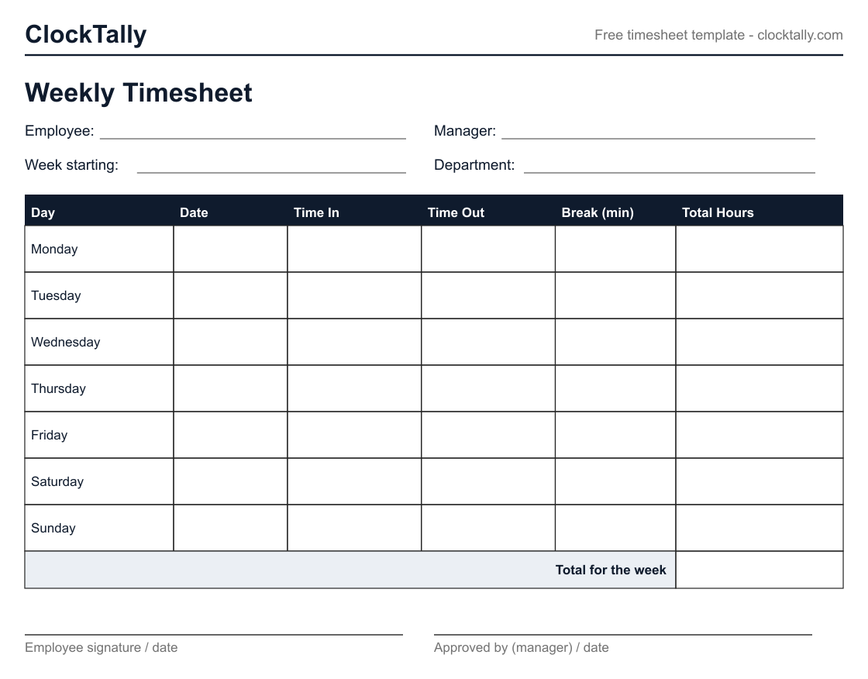
A weekly timesheet template is a one-page form covering a single Monday–Sunday week: one row per day with the date, time in, time out, unpaid break, and daily total, plus a weekly total and signature lines. Download it below as a blank printable PDF or a fillable PDF you can type into — free, no signup.
Both are free, one page, US Letter. The blank version is for printing and filling in by hand; the fillable version can be typed into in any PDF reader before printing or saving.
What's on the weekly template
The sheet has everything payroll needs to reconstruct a week and nothing it doesn't:
- Header fields — employee, manager, week starting, department.
- One row per day, Monday to Sunday — date, time in, time out, unpaid break in minutes, and the day's total hours.
- A weekly total box — the number payroll actually uses.
- Signature lines for the employee and the approving manager, which is what turns a scribbled record into an approved timesheet.
How to fill it in
- Write the date and your clock-in and clock-out times each day as they happen — end-of-week memory is the main source of timesheet errors.
- Record only unpaid breaks (a 30-minute unpaid lunch = 30). Short paid rest breaks count as work time and stay inside your in/out span.
- At the end of the week, total each day, then the week. The fastest accurate way is to type the times into the free time card calculator — it subtracts breaks, splits overtime, and converts to decimal hours for you.
- Sign it and hand it to whoever approves hours.
If your pay period covers two weeks, use the bi-weekly timesheet template instead — overtime is still counted per week, and that version keeps the two weekly subtotals separate for exactly that reason.
Blank vs fillable — which to download
The blank timesheet PDF is for printing a stack and filling them in by pen — the normal case for job sites, kitchens, and anywhere a phone isn't practical. The fillable PDF has real form fields, so you can type into it in any PDF reader (or most browsers), then print or save the completed copy. Both are one page, US Letter, and print clean in black and white.
Is this weekly timesheet template really free?
Yes — no signup, no watermark beyond the small ClockTally header, no paid version. Print or download as many copies as you need, including for a whole team.
Does the template calculate hours automatically?
No — a PDF can't do the time math reliably. Fill in the punches on paper, then total the week in the time card calculator, which handles unpaid breaks, overtime, and the minutes-to-decimal conversion payroll expects.
What week start should I use?
Use your employer's defined workweek, which can start on any day — it's a fixed, recurring 168-hour period. The rows are labeled Monday–Sunday, but the dates you write in control the actual week.
Can I use it for overtime tracking?
Yes. Under federal law, overtime is time worked beyond 40 hours in the workweek, so a one-week sheet with a weekly total is exactly the record you need. See the time and a half glossary entry for how the premium is figured.
Related tools and templates
- All timesheet templates — print any version straight from your browser.
- Bi-weekly timesheet template — two weeks with per-week subtotals.
- Monthly timesheet template — a compact 31-day log.
- Time card calculator — totals a filled-in sheet, with breaks and overtime.
- Pay period calculator — map out which dates each paycheck covers.